



If you are a freelancer and you do not have a portfolio yet, you are probably losing clients without even knowing it.
I say this from experience. A while back, I was reviewing applications from video editors for a project. Most of them sent a Google Drive link, a WeTransfer file, or just a YouTube playlist. A few had an actual portfolio website. Guess who I paid attention to first? The ones with the portfolio. Every single time.
It is not that the others had bad work. Some of them were actually talented. But when you land on someone’s portfolio site and everything is clean and organized, you already feel the professionalism before you even watch a single video. That feeling matters. It builds trust fast.
The good news? You do not need to spend money or learn code to have that. In this article, I will show you exactly how to build a clean, professional portfolio website in less than 5 minutes, for free.
Why Most Freelancers Skip the Portfolio (And Why That is a Mistake)
A lot of freelancers, especially beginners, think a portfolio website is something you build “later.” When you have more work. When you have more time. When you know exactly what you want.
But that thinking keeps you stuck. Clients do not wait. And in a competitive market, the person who looks more professional almost always gets the opportunity, even if their work is similar to yours.
Sending a Google Drive folder says: “Here are my files.” A portfolio website says: “Here is who I am and what I do.”
There is a big difference. One is a file dump. The other is a first impression.
The Tool You Need: Lovable.dev
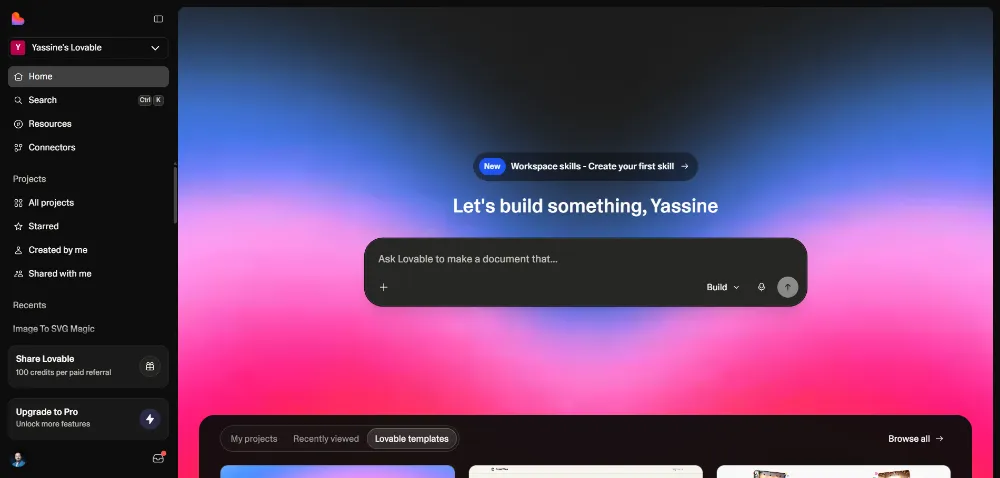
There are many website builders out there, but for this specific use case, creating a fast, good-looking portfolio with zero technical knowledge, Lovable.dev is one of the best options I have come across recently.
Here is why it works so well for freelancers:
- You type a description of what you want (called a “prompt”), and it builds the site for you
- No drag and drop, no templates to fight with, no code to write
- It gives you a real working website with sections like hero, services, portfolio, about, and contact
- The free plan is enough to get started
You just sign up with your Gmail account and you are ready to go.
Before You Hit Generate: The Step Most People Skip
This is where a lot of people make a mistake. They type a quick prompt, press generate, and then spend the next hour trying to fix things that were wrong from the start. That burns through your free credits fast.
Instead, take 5 minutes to prepare before you generate anything.
Here is what you should have ready:
- Your logo (even a simple text logo works)
- A profile photo (professional or clean, nothing too casual)
- 3 to 5 samples of your work (your best pieces only)
- Your contact email
- A short description of what you do and who you help
One Important Note for Video Editors
If your work is video, do not link directly from Google Drive. Google Drive links open outside your site, which breaks the experience and looks unprofessional.
Instead, upload your videos to YouTube (you can set them as unlisted if you do not want them public) or use Vimeo. This way, the videos play directly inside your portfolio, the visitor stays on your site, and you control the experience from start to finish.
Writing Your Prompt
Lovable AI Prompt
Create a premium, high-converting personal brand portfolio website for a professional [YOUR PROFESSION].
The goal of this website is to attract high-quality clients and position me as a strategic expert, not just a freelancer.
Brand Positioning:
I help [TARGET AUDIENCE] achieve [SPECIFIC RESULT] through strategic and high-quality [CORE SERVICE].
Design Direction:
- Minimal and modern
- Clean layout
- Strong typography
- Premium spacing
- Smooth animations
- Fully responsive|
- Conversion-focused structure
- Cinematic and professional feeling
Website Structure:
1. Hero Section
Headline:
"I help [TARGET AUDIENCE] achieve [SPECIFIC RESULT] through strategic [CORE SERVICE]."
Subheadline:
A short positioning sentence showing authority and experience.
CTA Buttons:
- View My Work
- Work With Me
Optional: Add subtle background animation or muted video background.
2. Authority Section
Display credibility elements:
- Years of experience
- Number of completed projects
- Industries worked with
- Key measurable achievements
3. Services Section:
For each service include:
- Service name
- The problem it solves
- The strategy used
- The outcome delivered
Main services:
- [SERVICE 1]
- [SERVICE 2]
- [SERVICE 3]
4. Portfolio – Video Showcase Section:
Display projects as VIDEO content, not image thumbnails.
Each project must include:
- Embedded video preview
- Auto-play muted when visible (if possible)
- Clean cinematic layout
- Project title
- Short description
- Client type
- Challenge
- Strategy
- Final measurable result
Layout Requirements:
- Clean grid layout
- Smooth hover effects
- Subtle play button animation
- Minimal interface
- Focus on the video itself
Include:
- One full-width featured video for the strongest project
- Optional category filters (Commercial / Social Media / Real Estate / etc.)
Do NOT present projects as static images.
Prioritize a cinematic, premium and strategic presentation.
5. Testimonials Section:
Include:
- Client name
- Role or company
- Short review
- Clean professional card design
6. About Me Section:
Include:
- Background
- Professional journey
- Philosophy in [YOUR FIELD]
- Why clients should trust me
Keep it concise and impactful.
7. Final Call To Action:
Strong closing section encouraging serious clients to contact me.
Include:
- Clear CTA button
- Short persuasive sentence
- Contact form
- Email
- Social links
The website must feel premium, strategic, and built to attract serious clients, not casual inquiries.
The prompt is just a description you write that tells Lovable what kind of site you want. You do not need to be a writer to do this well.
A good prompt includes:
- Your profession (video editor, graphic designer, copywriter, etc.)
- Your target audience (brands, agencies, small businesses, coaches, etc.)
- The main services you offer
- The result your clients get from working with you
For example, something like: “Build a portfolio website for a freelance video editor who works with small businesses and content creators. Include a hero section, a services section, a portfolio with video embeds, an about section, and a contact form.”
That is enough. Lovable will figure out the rest.
Once you add your prompt along with your logo, photo, and video links, the tool places everything in the right spot. You will not need to rearrange much after.
HTML Structure
[YOUR PROFESSION] →
•	Video Editor
•	Photographer
•	Brand Designer
•	Digital Marketer
•	Social Media Strategist
[TARGET AUDIENCE] →
•	Real Estate Agencies
•	 E-commerce Brands
•	 Personal Brands
•	 Coaches & Consultants
•	 Startups
•	 Local Businesses
•	 Luxury Brands
[SPECIFIC RESULT] →
•	Increase sales
•	Generate more qualified leads
•	 Sell properties faster
•	Build a strong brand identity
•	 Improve engagement
•	Scale paid advertising performance
[CORE SERVICE] →
•	Strategic Video Editing
•	Branding & Visual Identity Design
•	 High-End Photography
•	 Paid Ads Management
•	 Conversion-Focused Web Design
[SERVICE 1] – [SERVICE 2] – [SERVICE 3] →
•	Examples for Video Editor:
•	Real Estate Video Editing
•	Social Media Reels Editing
•	Commercial Video Production
•	Examples for Designer:
•	Brand Identity Design
•	Logo Design
•	Packaging Design
•	Examples for Marketer:
•	Facebook & Instagram Ads
•	Funnel Optimization
•	Lead Generation Campaigns
[YOUR FIELD]
Your industry or specialization (used in About section).
Examples:
•	Video Production
•	Branding
•	Digital Marketing
•	Web Development
•	Visual Storytelling

Example (Complete Replacement – Video Editor)
Instead of:
I help [TARGET AUDIENCE] achieve [SPECIFIC RESULT] through strategic [CORE SERVICE].You write:
I help real estate agencies sell properties faster through strategic video editing.
The more specific you are, the more premium your positioning becomes.
Editing Your Portfolio After It Generates
When the site is ready, you will want to personalise it with your actual information. Lovable makes this easy with a visual editing mode.
Click on any element in the site preview and you can change the text directly from the side panel. No code, no settings menus. Just click and type.
Some things you will want to update:
- Your name and headline in the hero section
- Years of experience, number of projects, client stats
- Your about section text (keep it short, personal, and focused on the client)
- Your contact information
Write your about section like you are talking to a potential client, not writing a resume. Focus on what you do, who you help, and what makes working with you worth it. Keep it to 3 to 4 sentences.
Setting Up Your Contact Form (This Step is Often Missed)
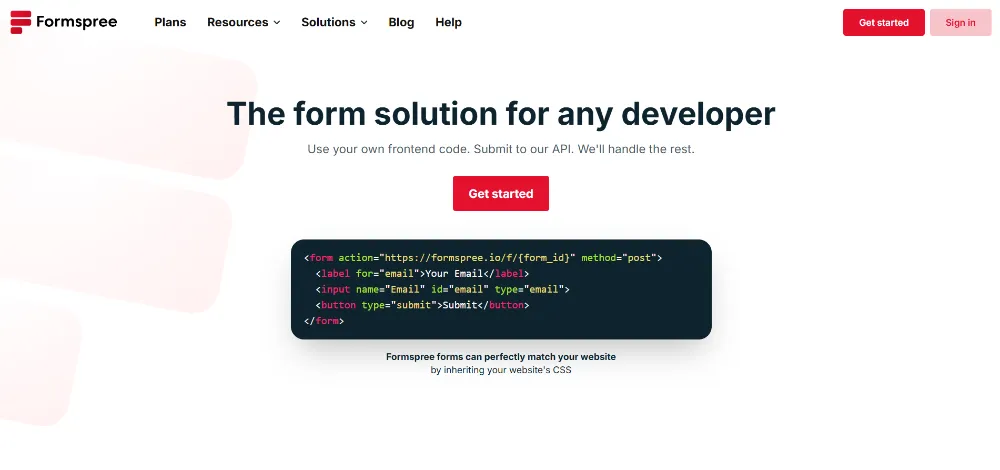
By default, the contact form on your new site does not actually send messages anywhere. You need to connect it to your email.
Here is how to do it:
- Go to formspree.io and create a free account
- Verify your email address (they will send you a quick confirmation)
- Create a new form and copy the form endpoint link they give you
- Go back to Lovable, paste that link into your contact form settings using a simple prompt
Contact form Prompt
Update the Contact form:
- On submit, POST the fields (name, email, message) to this Formspree endpoint:
https://formspree.io/f/***********

Implementation:
- Use fetch POST
- Send JSON (Content-Type: application/json)
- Show loading state on the button
- Show success message “Message sent”
- Show error message if failed
- Clear inputs after success
Once that is done, every time someone fills out the form on your site and hits send, the message goes straight to your inbox. Test it yourself to make sure it works before you share your portfolio with anyone.
Publishing Your Portfolio
When you are happy with everything, hit Publish. Lovable will ask you to choose a name for your site URL.
Pick something clean and professional. If your name is Ahmed and you are a video editor, something like “ahmed-videoeditor” works fine. Avoid numbers or random characters.
On the free plan, your link will end with “.lovable.app” which is fine when you are just starting. If you want a custom domain like “yourname.com,” you will need to either upgrade Lovable or connect the site to a domain you own separately, which is something worth looking into once your portfolio is up and running.
Your Portfolio Is Not Finished, It Is Just Starting
Here is something important to understand. Your portfolio is not a one-time project. It is a living part of your freelance business.
Once it is live, keep it updated. Add new work as you complete it. Refresh your about section as your experience grows. Update your stats. Remove older work that no longer represents your best.
A portfolio that has not been touched in two years tells a story too, and it is not a good one.
Conclusion: No More Excuses
You now have every step you need. A free tool, a clear process, and less than 5 minutes of actual work.
The only thing standing between you and a professional portfolio is the decision to start.
If you want to see the full process in action, I made a video showing exactly how I built one from scratch using Lovable. I walk through every step so you can follow along and have your own portfolio ready by the end.
Watch the video here and let me know in the comments if you have any questions. I read every one.
Tbarklah 3lik ❤ merci bcp pour votre temps
Courage chef 🙌🏻
great job 🔥
Vidéo nadi akhouya tbarkllah 3lik